
A whole class, a real AI model, one period.
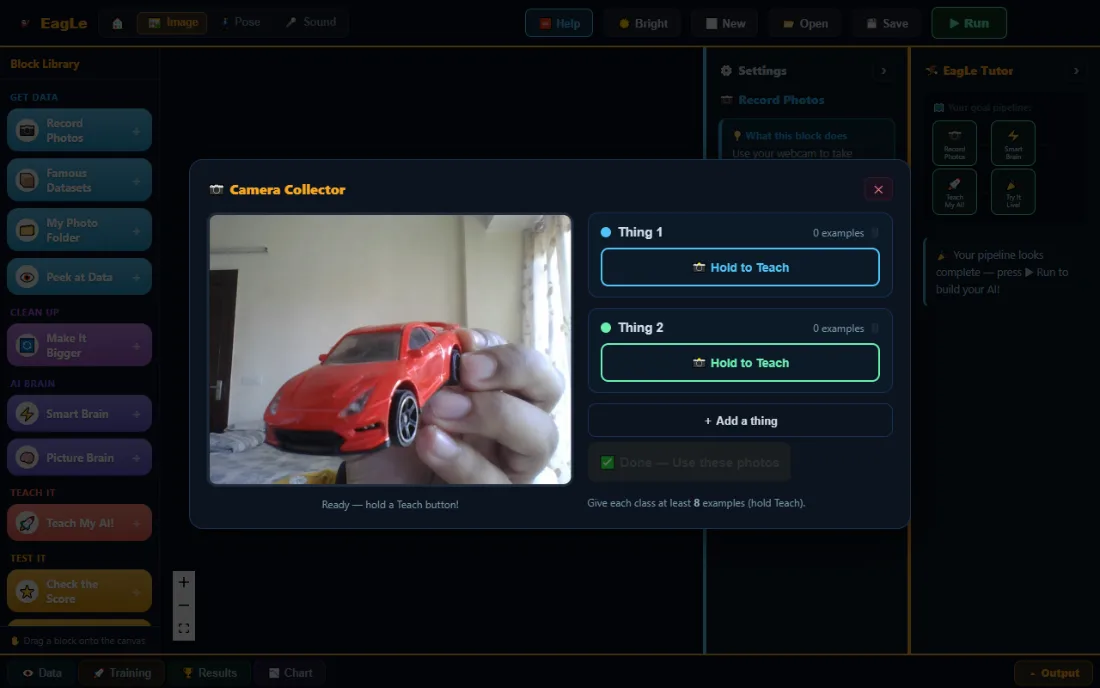
Every learner collects their own examples, trains a model in the browser, tests it on examples it never saw, and explains its mistakes. On the devices your school already has.
Learners build AI, then find out why it fails
Knowing about AI is not the same as being able to work with it. EagLearn lessons are hands-on from the first minute.
Real models
Every learner trains an actual model on their own device, from examples they chose.
Honest scores
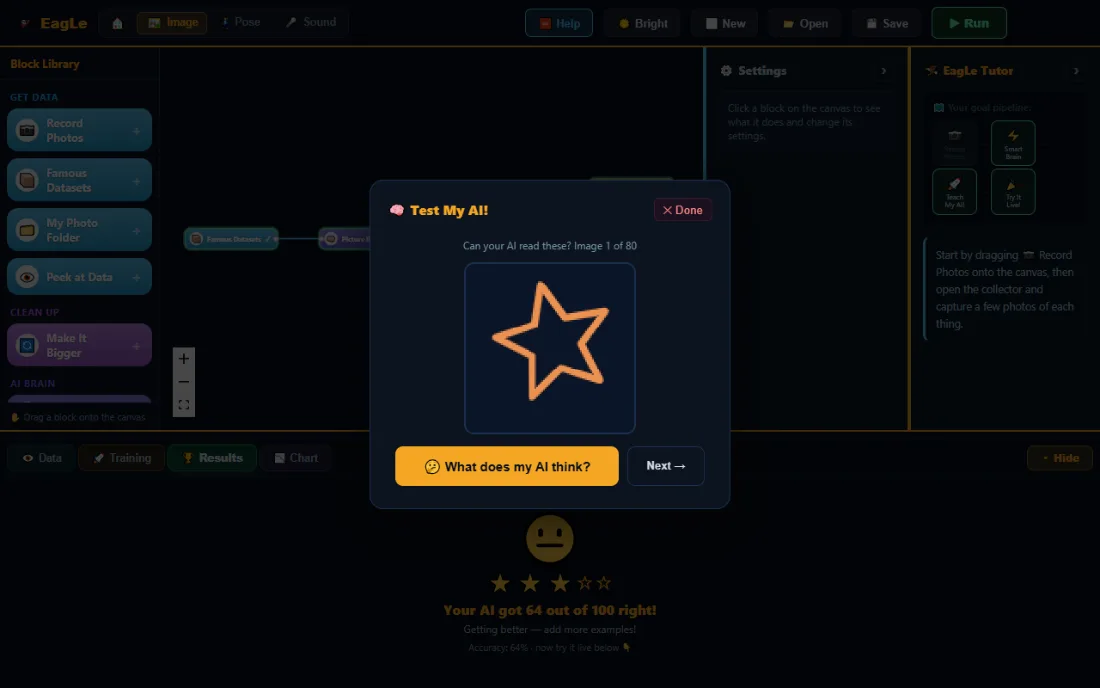
Each model is tested on examples held back from training, so learners meet real mistakes.
Explaining, not just using
The tutor and the X-Ray turn every mistake into a question the class can answer.
Private by design
Photos, sounds and poses never leave the device a learner is using.
What a session looks like from the room
Every learner has their own screen and their own set of examples, so no two models are the same. That difference is what the class discusses at the end.
Learners work, the tutor guides
A tutor in the lab names the next step, so the teacher is not the only help in the room.
The teacher leads the discussion
Why did one model do better? Which examples confused it? The model is the reason for the conversation.
Nothing left behind
Projects are saved as a file the learner keeps. Nothing stays running on the school’s machines.
Built around the AI project cycle
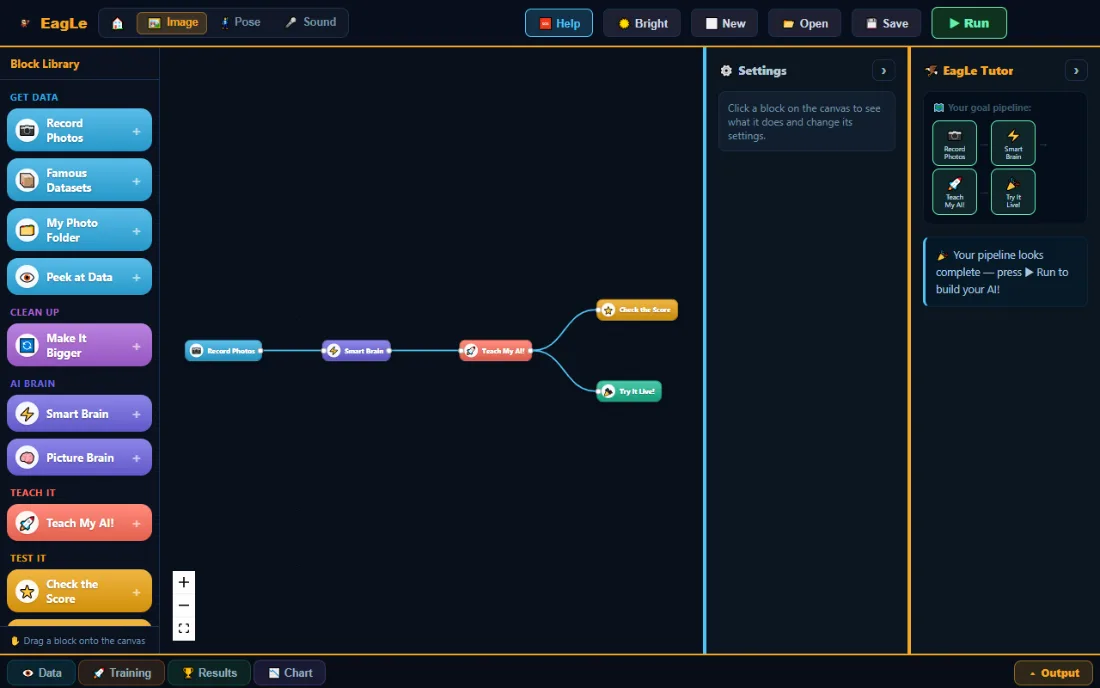
Every lesson follows the cycle in CBSE’s Computational Thinking and AI curriculum (2026-27): collect, train, test, reflect. The syllabus is CBSE’s; the mapping below is ours, and we will walk your teachers through it.
- Algorithmic thinking and patterns
- Learners sort examples into groups, then watch the computer find the pattern they sorted by. The blocks they join are an algorithm.
- Computer vision and classification
- A learner trains a camera model on their own photos, or a sound or pose model, and tests it on examples it never saw.
- The AI project lifecycle
- Collect, train, test, study the mistakes, improve: the whole loop, inside one period.
What learners can do afterwards
Explain learning from examples
Say why the examples decide what a model can do.
Read an honest score
Tell a score on new examples from a score on studied ones.
Improve with evidence
Find what the model confuses and fix it with better data.
How each journey continues the path: the six learning journeys.
Teach a computer to see, in one period
A first lesson with the Junior image lab, for one class, in the computer lab or on the devices learners already have.
- 0 to 5 min
Open the link
Learners open the lab in the browser. There is nothing to download and nothing to set up first.
- 5 to 25 min
Collect the examples
Each learner shows the webcam two things and records their own examples. Every learner ends up with a different set.
- 25 to 35 min
Train, then test it
Training runs on the learner’s own machine. The app then tests the model on pictures it has never seen and gives it a score.
- 35 to 40 min
Find the mistake
The class looks at what the model got wrong and says why. That discussion is the lesson.
You will not be doing this alone
EagLearn is new. A school joining now works directly with the person who built it, and has a real say in what gets made next.
- A plan for your first period
- Tell us your classes and your lab, and we reply with a plan for one period you can run, and sit in on it if you would like.
- Help inside the labs
- A tutor in every lab names the next step. Maker adds 66 chapters with questions and tap-to-see answers, in English and Hindi.
- Built by a teacher
- Dr. Kushagra Goyal taught AI and robotics in Indian schools before building EagLearn. Our story.
Not available yet
We would rather say so than let you find out in class:
- A teacher dashboard or gradebook.
- Class accounts that a teacher manages.
- Printed lesson plans and worksheets.
If one of these decides it for your school, tell us. It helps us choose what to build next.
What your lab needs
If the machines in your lab open a website, they can run the labs. Here is the whole list, and what we do not know yet.
- A browser
- A current Chrome or Edge for everything. Junior also runs in other current browsers; Maker needs Chrome or Edge to connect a board.
- A device
- Any laptop, desktop, Chromebook or tablet. Phones work too: both apps have a phone layout.
- A webcam or microphone
- For the lessons that see, hear or watch a pose. A built-in webcam is enough.
- No installs, no admin rights
- Nothing is copied onto the machine. A learner account on a locked-down machine is fine.
- Network
- Ordinary school Wi-Fi. The page and the AI models load once; training does not use the network.
- Robots and boards
- Optional, and only for Maker. Junior needs no hardware. Most Maker projects need an Arduino Uno, a servo and a few LEDs.
What we cannot know in advance
Some schools’ settings block things the labs need. We have not tested every school setup, so one trial period first is the honest way to find out:
- Device policies that block the webcam or microphone in the browser.
- Network filters that block the AI models, some of which load from Google’s servers.
- Very old or very slow machines: training is quicker on newer ones.
Learners’ data: photos, sounds and poses stay in the browser and are never uploaded; training happens on the device; projects are saved as a file; an account keeps a name, an email address and the school name and role given at sign-up. Privacy Policy.
Start with one period
Free during early access, for a class, a section or the whole school. No purchase order, no card. If EagLearn is not the right fit, we will say so.
Tell us
How many learners, which classes, and what the lab has.
Get a plan
We reply by email with a plan for one period.
Run it
One class, one period, with us there if you would like.
Decide
Keep going, change the plan, or stop. Projects stay with your learners.
Bring EagLearn to Your School
Tell us about your school. We reply by email, usually within a day. Prefer email? Write to eaglearn.info@gmail.com.
Want to see it first? Try a Junior lab yourself. It takes a few minutes and a free account.
What does it cost a school?
Do we need to install anything or change lab settings?
Where do learners’ photos and sounds go?
Do teachers need to know AI?
Tell us about your school
One period is enough to know.
Run one lesson with one class. Then decide.