
- Early Years, journey 1
- Junior, journey 2
- Maker
- Explorer, journey 4
- Creator, journey 5
- Researcher, journey 6
Sense. Think. Act. AI that moves something real.
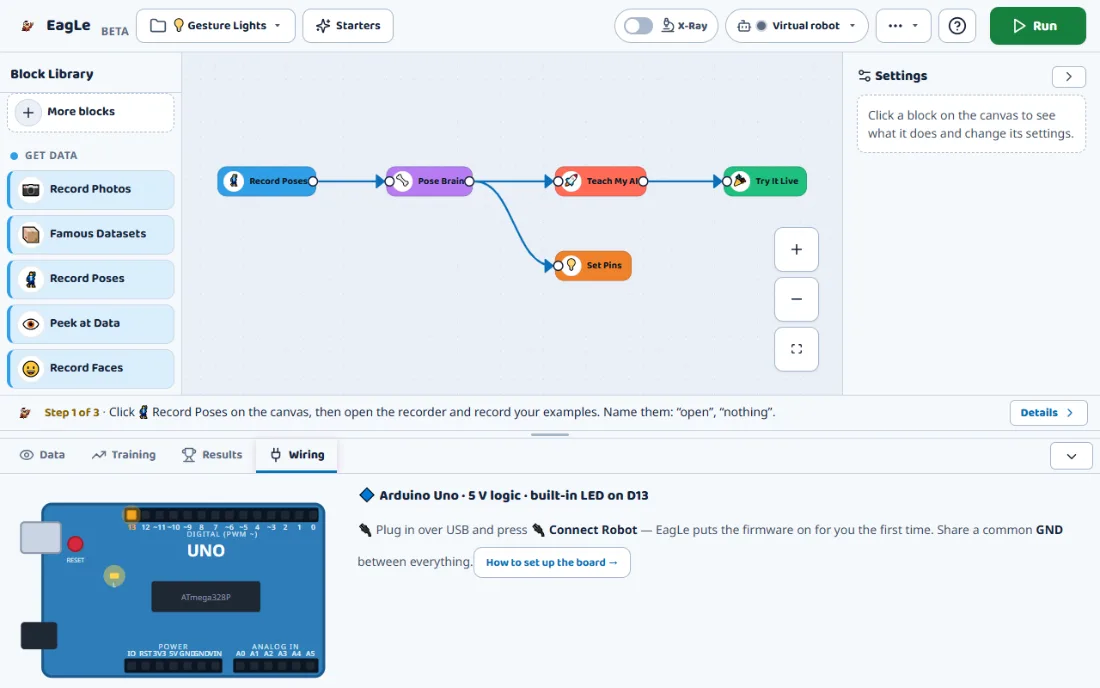
Learners build an AI brain from blocks, program what it should do, and connect it to an Arduino or ESP32 board. With no kit, a robot on screen does the same.
- 1Sense
- 2Think
- 3Act
- Who it is for
- Learners ready to make AI do something: after Junior, or straight in with a starter project.
- What learners build
- Gesture lights, a hand-steered car, a sorting arm, a talking robot. 22 starters, 19 AI brains.
- What you need first
- Chrome or Edge with a webcam. A board is optional: an Arduino Uno or ESP32 and a few parts.
- Available now?
- Yes. Free during early access, with a free account.
The journey where an answer becomes an action
Junior ends with a model that answers. Maker adds the other half: deciding what to do with the answer, and doing it.
What makes this stage different
Maker brings three subjects together: AI, programming and electronics. Learners program with blocks in a line, if and else brackets, loops and variables, using the words real programmers use. Then a decision becomes a signal on a pin.
It also has many more kinds of AI than Junior: 19 brains for pictures, poses, sounds, faces, words, tables, sensor signals and learning by trying. Some come ready-made, most are trained by the learner, and every one can be opened with the X-Ray.
Explains sense, think, act
Describes how a robot takes in the world, decides, and acts, and which block does each part.
Programs decisions
Uses if and else, repeat, wait and variables to turn an answer into behaviour.
Wires parts with care
Follows the app’s wiring drawing for a board and its parts, and knows why motors need a driver.
Compares rules and models
Tells a rule a person wrote from a rule a model learned, and chooses which one fits.
Inside the app
Real screens from Maker. Every brain has a live window, an X-Ray and a wiring view.
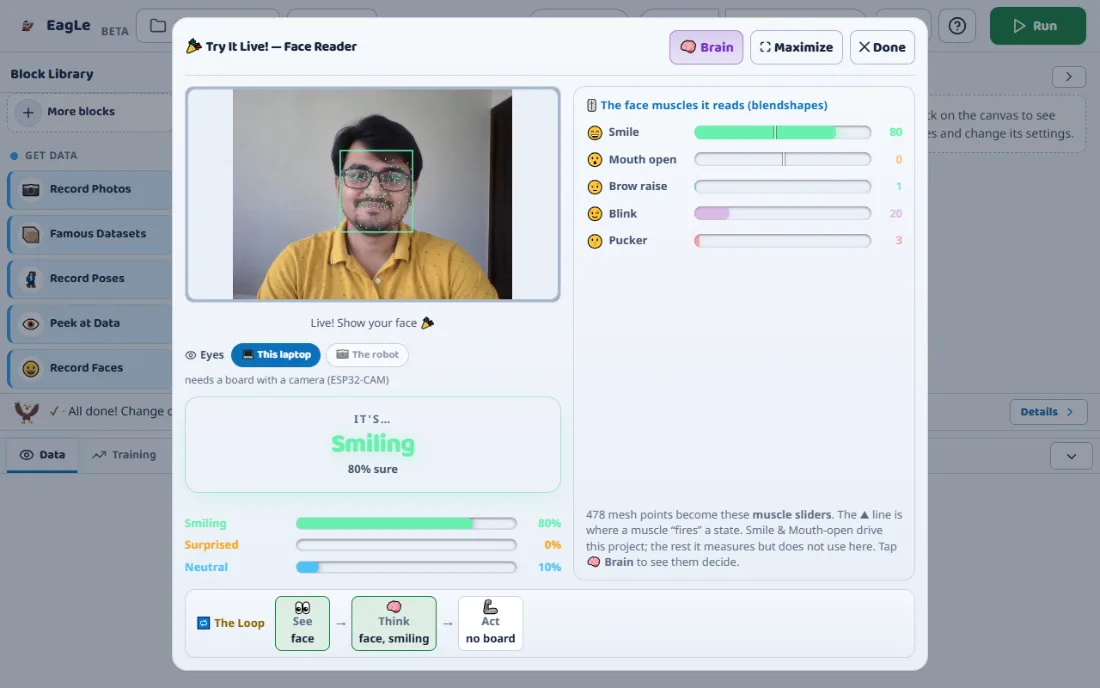
Watch it decide, live
The live window shows what the brain sees, its answer and how sure it is, and what the robot does about it. The Loop along the bottom lights up See, Think and Act as they happen.
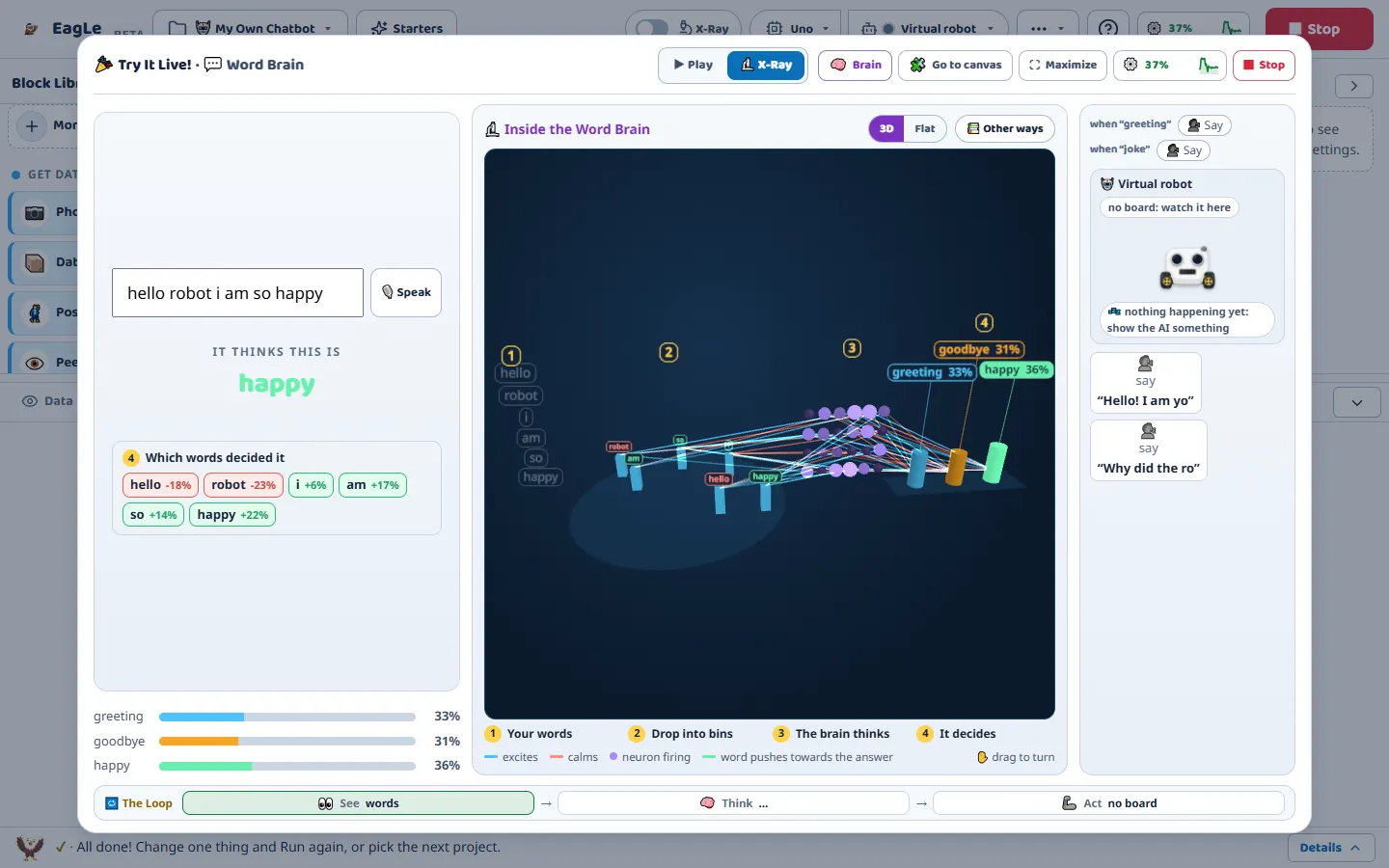
Look inside every brain
Every X-Ray follows four steps: what the brain is given, what it turns that into, the brain working, and the decision and why. It is drawn from the running brain’s own numbers.
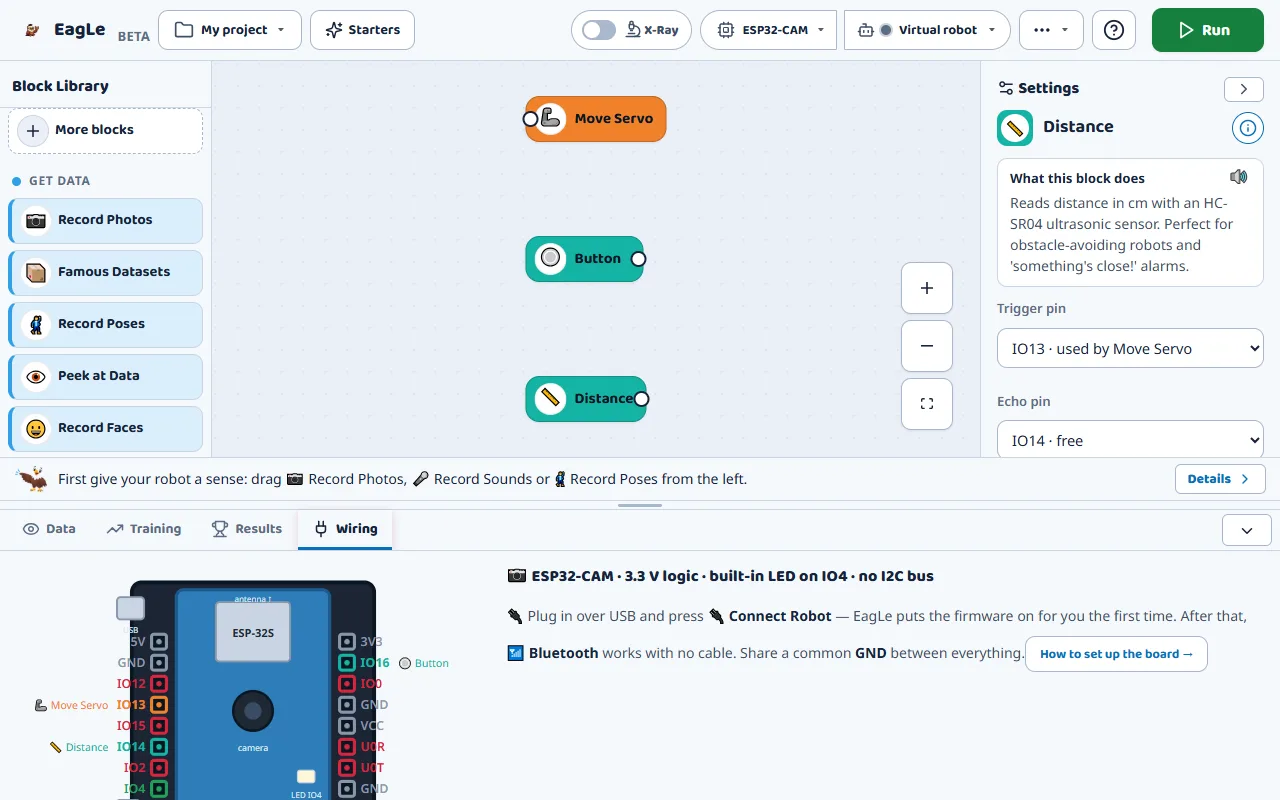
Every wire, drawn
The app draws the chosen board and colours each pin with the part plugged into it. Pins already in use are marked, so two parts cannot share one by mistake.
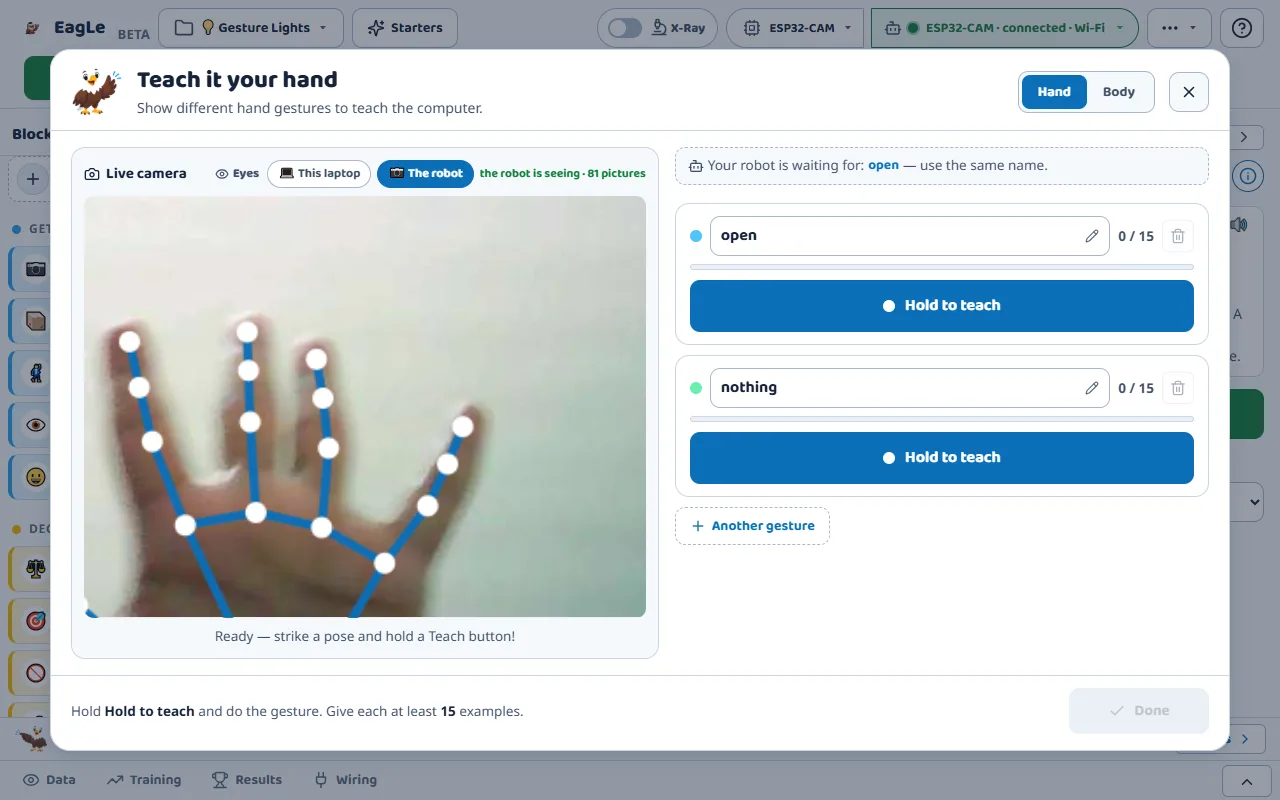
The robot’s own camera
On an ESP32-CAM board, the robot’s camera can replace the laptop’s webcam, over Wi-Fi. The brain then sees what the robot sees.
Sense, think, act
Every Maker project is built from the same three moves. Blocks in a line run in order, from left to right.
Sense
A camera, a microphone or one of 19 sensor modules takes in the world: a gesture, a word, a distance, a temperature.
Think
An AI brain or a rule turns that into a decision: “open hand”, “someone is close”, “happy”. If Class and If Sure start a line only when it should.
Act
The decision drives a part: a servo turns, a motor drives, an LED lights, a buzzer sounds, a screen or a voice speaks.
Between think and act sits the program: If as a bracket with a then and an else arm, Repeat around the blocks it repeats, Wait, Stop and Remember for variables. “Download my robot’s code” writes the whole canvas out as a readable Arduino sketch.
Gesture Car: drive a robot with your hand
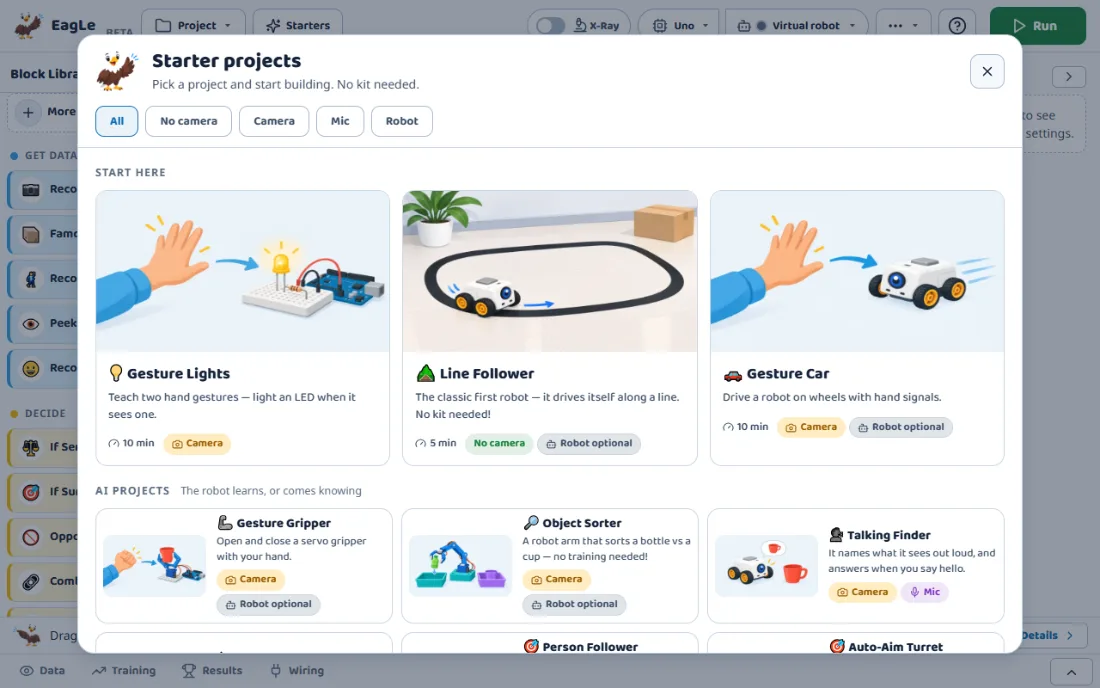
One of 22 starter projects. Learners teach two hand signals, go and stop, and the car obeys. Then they add their own: left, right, faster.
- What the learner builds
- A Pose Brain for two hand signals, go and stop, and a Drive block wired to two DC motors through an L298N driver.
- What the AI contributes
- A hand tracker finds 21 points; the Pose Brain learns which pattern is which signal.
- What the learner must understand
- The car does only what the brain decides, so a confused brain means a confused car. An If Sure block makes it wait until the brain is sure.
- How it is tested
- On the on-screen robot first, then on a real car with two DC motors and a driver board.
What learners can explain after Maker
A decision becomes a signal
The brain’s answer turns into a number on a pin, and the part reacts to that number.
Rules and models are different tools
A line follower uses a rule a person wrote; a gesture car uses one a model learned.
Ready-made and trained brains
Some brains arrive already trained, such as the object finder; others learn only from the learner’s examples.
Confidence needs a threshold
A robot should act only when the brain is sure enough. If Sure makes that a setting the learner chooses.
Parts have limits
Motors draw more power than a board can give, which is why a driver board sits between them.
Programs run in order
Blocks in a line run left to right, loops repeat, and a wait is time the robot spends doing nothing else.
Test on screen, then on the robot
Every brain is scored on examples it never saw, and the app says when it is memorising instead of learning.
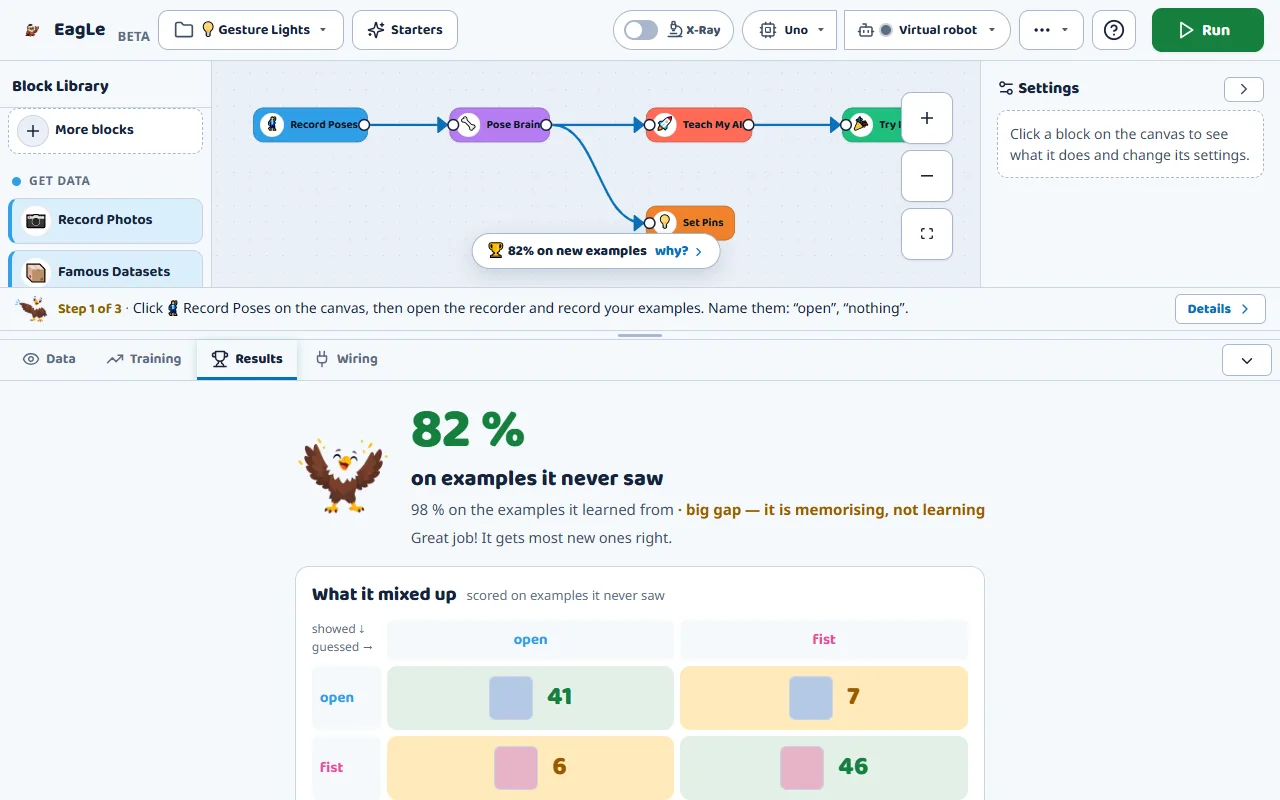
Two scores, side by side
New examples against studied ones. A big gap means the brain memorised and needs more varied examples.
What it mixed up
A table of which class it confused with which, counted on new examples.
The virtual robot first
Programs run on the on-screen robot, so a mistake costs nothing. Then the same blocks drive the real one.
Checks before running
The app warns about two parts on one pin, a motor with no driver, or a block that ran but sent nothing.
Being tested Check a Part, a way to test one part with no blocks, is built but not yet proven on every board.
Classroom versions of real machines
Sorting by camera
Factories sort objects by what a camera sees. Object Sorter does it with a servo arm and a ready-made object finder.
Staying on the line
Warehouse robots and lane-keeping cars follow lines. Line Follower is the classic first robot, and it works with no kit on screen.
Lights that notice you
Motion sensors switch lights and alarms. Guard Robot sounds an alarm when something comes close.
Where Maker sits on the path
Maker follows the same project cycle as Junior and adds programming and electronics. Its 66 chapters each note where their topic sits in a school syllabus.
For teachers and parents
Start with nothing. Add parts only when the robot needs to leave the screen.
- Starter projects
- 22 ready projects, each with its time and parts. The first ones take 5 to 10 minutes.
- A textbook inside
- 66 chapters on the science behind every block, with questions and tap-to-see answers, in English and Hindi.
- The code is visible
- “Download my robot’s code” writes the canvas out as an Arduino sketch learners can read.
- No kit needed to begin
- The on-screen robot runs the same program, wheels and all, and a virtual world adds a line track and pretend sensors.
- A first kit
- Most projects need an Arduino Uno, one servo and a couple of LEDs. An ESP32 adds Bluetooth and Wi-Fi.
- Phones and offline
- Maker works on a phone, and keeps working offline after the first visit.
Open now, in Chrome or Edge
Create a free account and open Maker. Connect a board only when you want to.
Free during early access
Everything in Maker: all 19 brains, all 22 starters, every block and every chapter.
You will be asked to create a free account first if you are not logged in.
- Browser
- Chrome or Edge on a laptop or desktop. Connecting a board by cable uses Web Serial, which these browsers have.
- Camera and microphone
- For the brains that see or hear. A built-in webcam is enough.
Boards and how they connect
- Proven on real boards
- Arduino Uno, ESP32 and ESP32-CAM: connecting, putting the firmware on with one click, and driving parts.
- Built, being tested
- Arduino Nano and Mega 2560.
- Cable, Bluetooth or Wi-Fi
- USB on every board. On ESP32 boards, Bluetooth with no cable, or Wi-Fi joined by a six-letter pairing code.
- No laptop
- Bake into robot puts sensor rules onto an Uno or ESP32 so they run with the laptop unplugged. Whole lines of blocks are being tested.
Parts it can drive and read
Outputs: LEDs, RGB LEDs and LED strips, servos and 360° servos, DC motors through L298N or L293D drivers, a two- or four-wheel car, a 16-servo driver board, stepper motors, buzzers, relays, LCD and OLED screens, digit displays, an MP3 player and the laptop’s voice.
Inputs: buttons, knobs, light, distance, temperature and humidity, motion, line, touch, sound, moisture, motion and tilt sensors, a colour sensor, a spoken keyword, and 19 kinds of three- and four-pin sensor modules.
Being tested Some newer parts and screens are built but not yet proven on a board.
Questions about Maker
Do I need a robot or a board?
Which boards work?
Is it the same as Junior?
Can learners see real code?
Does it work offline or on a phone?
Is EagLearn Maker free?
Build one robot. Then look deeper.
Explorer, the next journey, is planned. It goes inside the networks Maker uses, and parts of it already run in Maker.